


Piano Magic Beat 4: Music Game
4.984.00 Reviews
App Specs
- Version
- 2.6.0
- Updated On
- License
- Free
- Downloads
- 5,000,000+
- Developer
- PulseBeat Studios
- Categories
- Music
- Platform
- Android
Screenshots




 Analysis by AppCompare
I find Piano Magic Beat 4: Music Game easiest to understand as a quick rhythm challenge rather than a piano lesson. Its appeal is the directness: follow the musical pulse with taps, pay attention to timing, and try to keep a run going. That makes it a natural choice when I want a small burst of play without learning a complicated control scheme. It is a music game from PulseBeat Studios, and its free-to-play entry point makes it easy to try before deciding whether this particular style suits me.
Unleashing Your Inner Maestro
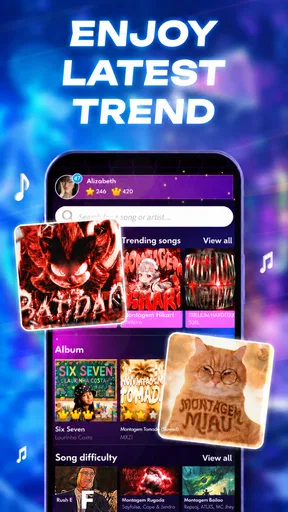
Jumping into Piano Magic Beat 4: Music Game is like stepping into a world where your fingers become the keys to an orchestra. The app sets a fun and engaging atmosphere, where you can feel like a maestro conducting a symphony. The interface is sleek and intuitive, making it easy for anyone to dive right in and start playing.
One of the first things you'll notice is the vast library of songs available. From classical pieces to the latest pop hits, there’s a track for every taste. And the best part? You’re not just tapping mindlessly; you’re learning to keep rhythm. The app does a great job of making the gameplay addictive while keeping the focus on improving your musical skills.
What the tapping asks of you
The central skill here is matching a visual cue to the music, not playing a physical keyboard or learning how to read sheet music. That distinction matters if you are choosing between a rhythm game and a piano-training app. I would use this one to practise attention and timing in a playful setting, but I would not treat a strong score as evidence that I can perform a song on an actual instrument.
For a first session, I’d begin with a familiar song if one is available, then focus on the beat rather than trying to chase a perfect run immediately. Familiarity gives you a reference point: you can notice whether your taps feel in time, while still following the tiles. Once the pattern becomes comfortable, a less familiar selection can make the game feel more like a test of quick reactions.
Gameplay that Hits the Right Notes
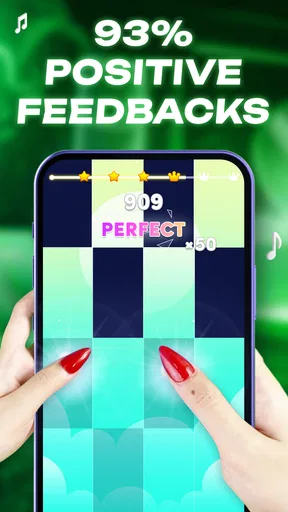
The gameplay is where Piano Magic Beat 4: Music Game truly shines. It’s all about timing and precision. You’ll find yourself fully immersed as you tap on the tiles in sync with the music. The challenge increases as you progress, with faster tempos and more complex patterns to master. But don’t worry, it’s all part of the fun!
Each level is designed to keep you on your toes, literally. You might start off feeling a bit like a beginner, but as you hit each note perfectly, there’s a real sense of accomplishment. The game provides a dynamic learning curve, gradually guiding you from novice to pro. And trust me, hitting those perfect streaks is incredibly satisfying.
Worth Reading Before You Choose

EA SPORTS FC Mobile 26 Is a Bigger Football Game, but It Takes Time

Flipboard Shows What News Apps Must Do Beyond the Feed

Switching to Android Auto Means Rethinking Your Driving Routine

Google Calendar Makes a Crowded Week Easier to Manage

Ludo King Makes the Most of the Minutes Between Plans

Baby Panda World Brings Quick Play to Modern Phones, but Its Game Library Feels Busy
Fast sessions, with a little room to settle in
The game’s basic idea is quick to grasp, which is a real advantage when I have only a few minutes. I can approach a song as a compact focus exercise: listen, watch, tap, and see how long I can maintain accuracy. At the same time, fast patterns demand more concentration than the relaxed description might suggest. If I am tired, distracted, or trying to play while doing something else, the same sequence can feel much less forgiving.
A useful habit is to treat an early attempt as a warm-up instead of restarting at the first mistake. That lets me get used to the rhythm and tile sequence before caring about a streak. If I want a score to compare later, I can then make a more deliberate run with the phone held steady and my attention on the screen. This small change makes short sessions feel less frustrating without requiring a special mode or setting.
Choosing a song for the moment
The song-led format is most appealing when I want music to shape the pace of a game. A familiar tune can make a quick break feel lively; an unfamiliar one can put more emphasis on reacting to cues. I would choose based on my mood and concentration rather than assuming every track will offer the same kind of challenge. Song choice can change how demanding a session feels, even when the core action stays simple.
It also helps to separate enjoyment from practice. If I keep replaying a track only to improve a run, the game becomes a focused score chase. If I switch songs when I start to feel stuck, it returns to being casual entertainment. That is a practical way to keep the experience fresh, especially for someone who likes rhythm games but does not want every session to feel like a test.
Features That Keep You Hooked
Beyond just playing songs, the app offers a range of features to enhance your experience. You can customize your gameplay with different themes and sound effects, which adds a personal touch to each session. Plus, there’s a leaderboard to fuel your competitive side as you strive to beat your friends' scores.
Another cool feature is the daily challenges. These keep the gameplay fresh and exciting, giving you a reason to come back every day. It’s not just about beating levels; it’s about improving your skills and seeing how far you can push yourself.
Using customization and competition thoughtfully
Changing a theme or sound effect is a small choice, but it can help make repeated play feel less visually or sonically samey. I’d keep the presentation that makes tile cues easiest for me to follow, rather than choosing an option just because it looks more dramatic. In a game built around quick visual reactions, comfort and clarity matter more than decoration.
The leaderboard is best treated as optional motivation. Comparing scores can give a solo session a target, but it can also shift attention away from enjoying the music. I would use it when I want a friendly benchmark and ignore it when I’m simply unwinding. Daily challenges offer another reason to return, though a daily prompt is a nudge, not an obligation; skipping a day should not turn a casual game into a chore.
Where it fits among music games
Compared with a conventional piano-learning app, this is a lighter, more arcade-like way to interact with music. A structured lesson tool is the better fit if I want instruction in technique, notation, or playing a real keyboard. Compared with rhythm games that centre on other instruments or more elaborate controls, the piano-tile approach is immediately understandable, but its simplicity may not satisfy someone looking for deep musical arrangement or a long progression system.
That trade-off is the point: easy entry comes with a narrower kind of interaction. I can recommend it to someone who likes tapping to songs, chasing accuracy, or filling a short wait with a focused activity. I would steer a player toward a different option if they mainly want to compose, practise piano fundamentals, or explore a rhythm game with more varied mechanics.
The game is free, and it is rated for Everyone, so its basic pitch is approachable for a broad audience. It has an average rating of 4.8 from around 20,000 ratings, with over 5 million installs. Those figures suggest plenty of people have tried it, but they cannot tell me whether its song selection or challenge level will match an individual player’s taste. I’d use them as a reason to consider giving it a try, not as a guarantee that every session will click.
Reliability in ordinary play
For a rhythm game, perceived responsiveness matters more than elaborate presentation: if I cannot keep a steady sense of when to tap, the central pleasure disappears. I would play somewhere comfortable, keep the screen unobstructed, and avoid dividing my attention between the game and another task. Those habits are useful regardless of device, and they make it easier to judge whether a missed cue came from my timing or from playing in an awkward situation.
I would also avoid drawing strong conclusions from a single interrupted session. A phone call, a notification, or simply putting the device down can break concentration in any tap-based game. When I return, I’d start with an easier-feeling song or a fresh attempt instead of expecting to pick up a fast sequence exactly where my attention left off. That is a sensible recovery routine for a game whose challenge depends on continuous focus.
Device expectations and practical limits
The game’s minimum operating-system requirement is version 7.0, and the current version is 2.0.0. That gives a basic compatibility reference, but it does not promise that every supported device will feel equally comfortable. Screen size, touch response, and the way I hold the phone all affect how confidently I can follow and tap tiles. On a smaller screen, I would pay particular attention to whether my fingers cover the next cue; on a larger one, I’d choose a grip that keeps both hands relaxed.
Because the experience centres on music and touch timing, I would expect a session to depend on both clear audio and a screen I can see easily. I would not assume the game is a good fit for playing in a noisy place or while walking: those situations make it harder to focus on the beat and react safely. A quiet seat during a break is a better everyday use case than trying to squeeze in a round while moving between tasks.
I also would not promise that it is especially light on battery, storage, or mobile data; those demands can vary by device and use. If I am planning a longer session away from a charger, I’d keep the play short and check my phone’s battery as I normally would. And if an older device feels sluggish, reducing other active tasks before playing is a sensible first step, rather than assuming the game itself will behave identically on every phone.
Who will enjoy it, and who may not
I think this is strongest for casual players who like recognizable music, quick feedback, and a clear personal goal such as improving a run. It can suit a short coffee break, a quiet wait, or a low-pressure evening session when I want something more engaging than passive listening. Someone who enjoys repetition in pursuit of better timing may find that the simple action has enough appeal to bring them back.
It is less suitable for anyone who dislikes tapping games, wants a realistic piano interface, or expects a music game to teach instrument skills in a structured way. Players who find score chasing stressful may also prefer a more open-ended music app. The distinction is not that one kind is better: it depends on whether I want a quick reaction challenge or a deeper tool for learning and making music.
Why You Should Download It Today
If you’re looking for an app that combines fun with a bit of skill development, Piano Magic Beat 4: Music Game is a fantastic choice. It’s an excellent way to unwind while still engaging your brain. Whether you’re on a quick break or settling in for a longer session, this app can provide the perfect musical escape.
As someone who’s spent countless hours playing, I can confidently say it’s a game worth downloading. The combination of music, rhythm, and a touch of competition makes it an addictive experience that’s hard to put down.
So, go ahead, give it a try. Download Piano Magic Beat 4: Music Game and start your journey to becoming a piano virtuoso. Who knows, you might just discover a hidden talent or a new favorite hobby!
My performance verdict
My overall recommendation is for short, attentive sessions rather than marathon play. The quick-to-grasp tapping concept makes it easy to start, while faster patterns give accuracy-minded players something to work toward. I would not make claims about speed or stability that apply to every device; the useful test is whether the cues feel comfortable and consistent on the phone I actually use.
For a realistic routine, I’d open it during a seated break, pick a song that suits my mood, play one attempt to settle into the beat, and then decide whether I want another round or a different track. If I keep missing cues, I’d pause instead of turning a relaxing game into a frustrating grind. That balance is where this kind of music game works best for me: focused enough to hold my attention, but easy to leave when the moment is over.
Pros
- Engaging rhythm gameplay.
- Diverse song selection.
- User-friendly interface.
- Offline play available.
- Customizable piano skins.
Cons
- Ads can be intrusive.
- Limited free songs.
- In-app purchases needed.
- Occasional lag issues.
- Repetitive gameplay over time.
FAQs for Piano Magic Beat 4: Music Game
What is Piano Magic Beat 4: Music Game?
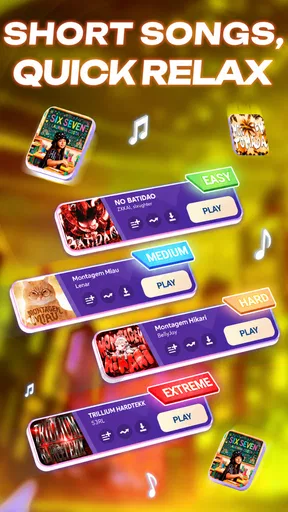
Piano Magic Beat 4: Music Game is a rhythm-based music game available for Android and iOS devices. It challenges players to tap on tiles in sync with popular songs, providing an engaging and interactive musical experience. The game is designed for both casual players and music enthusiasts, offering various difficulty levels.
How does the gameplay work in Piano Magic Beat 4?
In Piano Magic Beat 4, players tap on tiles that appear on the screen in rhythm with the music. The objective is to hit the tiles accurately as they align with the beats of the song. The game features different tracks and levels, each with unique challenges and increasing difficulty to test your timing and reflexes.
Are there any in-app purchases in Piano Magic Beat 4?
Yes, Piano Magic Beat 4 includes in-app purchases. These can range from unlocking additional songs and themes to removing ads for an uninterrupted experience. While the game is free to download, these purchases enhance gameplay and provide a more personalized experience for players who wish to delve deeper into the app's features.
Can I play Piano Magic Beat 4 offline?
Piano Magic Beat 4 can be played offline, allowing you to enjoy the game without an internet connection. However, some features, such as downloading new songs or accessing online leaderboards, will require an internet connection. Playing offline is ideal for maintaining your progress and practicing tracks without interruptions.
What are the main features of Piano Magic Beat 4?
Piano Magic Beat 4 offers a variety of features, including a wide selection of popular songs, different difficulty levels, and vibrant graphics. The game also boasts a user-friendly interface, making it accessible to players of all ages. Regular updates ensure fresh content, keeping the gameplay exciting and challenging.


